Working of Git
Git stores all the changes in code by their SHA-1 hash.
All the changes including the object database ,reference, and configurations are stored in the hidden .git directory on the same project within the text formate.
Git stores the screenshots of the file.
.git folder
.git is a folder where all the history of changes in file has been saved.
Components of .git folder
objects:Here all the actual content is stored in the compressed format.
refs:It stores references where subdirectories are contain.
head:It tells about the current file .where are you working currently?
index:It sends the changes in staging area.
config:This file stores repository configuration setting.
logs:This folder contains history of action.
If any one deleted .git folder the record of change has been deleted.
Git Objects
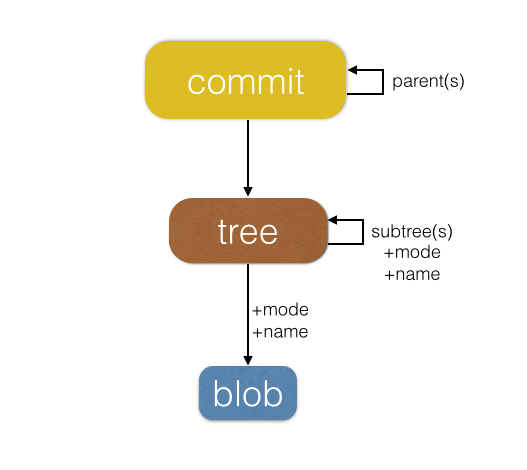
It is a type of object that store project’s history.
Primary it has 3 types:
blob
tree
commit
1.blob
It stores only content.
If multiple files having same content then it stores only one blob.
If you rename the file blob’s hash cannot change.
2.tree
Its organising blobs and other trees in the hierarchical structure.
It also represents a snapshot of a directory at the current time.
It links file name and path name with the blob hash.
3.commit
It represent the complete snapshot of the file.
It also includes Author ,Timestamp and commit message.
Changes Track
Git track changes by changing hash if same file then it give same snap and if different file then it give different hash for track the change in the file.
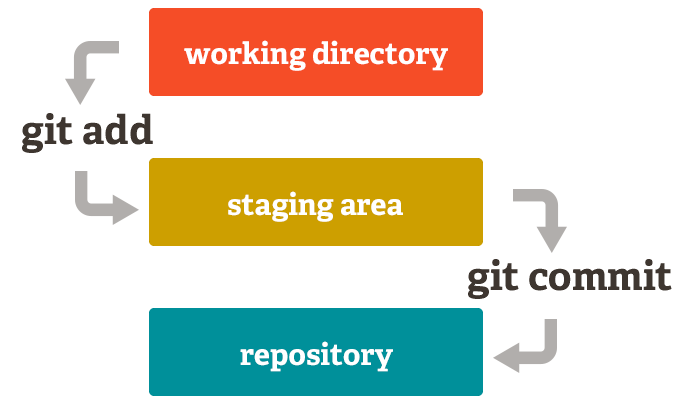
Instead of tracking file changes line by line, Git stores the complete content of each file as a blob object when the file is added to the staging area.
Comments
Join the discussionNo comments yet. Be the first to comment.